How to Publish Your Game on itch.io Fast: A Step-by-Step Recipe
Learn how to publish your game on itch.io fast. Export your project ZIP, generate listing metadata with AI, and launch your web game in minutes.
Once you finish building a game in Pixelfork, hitting Publish and sharing the web link with friends is great for quick plays. But if you want to reach a broader audience, learning how to publish your game on itch.io for free is the best next step. Here is a fast, no-nonsense recipe to get listed in minutes.
Here is a fast, no-nonsense recipe to get your Pixelfork game listed on itch.io in minutes—including a prompt trick to automate the entire metadata setup.
By haruka_apps · 22 September 2026 · 5 min read
Prerequisites
A playable game completed in Pixelfork.
An active account on itch.io.
Step 1: Download the Project ZIP from Pixelfork
First, export your raw game files:
In the Pixelfork editor, open the Export menu in the top-right corner.
Select Project ZIP and download it to your computer.
Tip: Do not unzip the file. itch.io requires the complete archive containing index.html and your project assets intact.
Step 2: Use AI to Generate Your itch.io Listing Metadata
On your itch.io Dashboard, click Create new project.
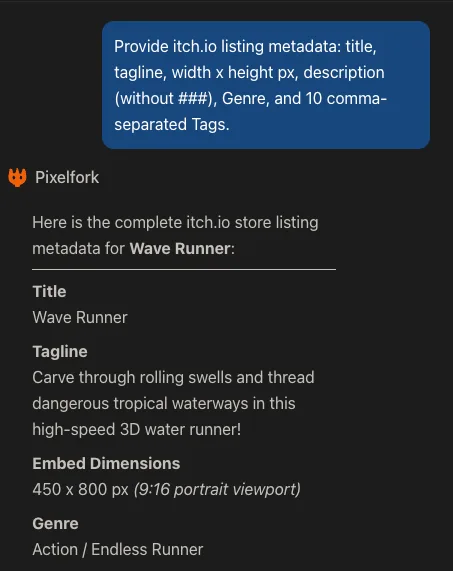
If you are publishing for the first time, the number of required fields might feel overwhelming. Instead of writing everything from scratch, open your Pixelfork chat and run this single prompt:
Copy-paste prompt:
Provide itch.io listing metadata: title, tagline, width x height px, description (without ###), Genre, and 10 comma-separated Tags.Pixelfork will return your game title, a short tagline, optimal viewport resolution, formatted description, genre, and ten targeted tags. All that’s left is copying and pasting them into the form.
Step 3: Fill in Your Project Details on itch.io
Go through the project setup page from top to bottom:
Title & Short description (Tagline): Copy and paste the title and tagline directly from your AI response.
Kind of project: Select HTML. This tells itch.io your game runs natively inside a web browser.
Pricing: Choose between $0 or donate, Paid, or No payments.
(Note: Setting up paid games or accepting donations requires payout and tax verification. If you want to get live immediately without setup friction, select "No payments".)
Upload files: Click Upload files and select your downloaded Project ZIP.
Crucial step: Once uploaded, check the box for "This file will be played in the browser".
Viewport dimensions: Enter the exact
Width x Height (px)values provided by your prompt output (e.g.,450 x 800).Frame options:
Check Mobile friendly (if your game supports touch/mobile layouts).
Check Fullscreen button (recommended for better player immersion).
Description: Paste the AI-generated description. To keep credit clear and inform players, consider adding this brief attribution at the end:
Technology: Three.js / WebGL
AI: Made with Pixelfork
Genre & Tags: Select the suggested genre and paste your comma-separated tags into the tags input to ensure discoverability.
AI generation disclosure: Check Yes, and check the applicable boxes (Graphics, Sounds, Text & Dialog, Code).
Step 4: Preview in Draft and Take Screenshots
Leave Visibility & access set to Draft, scroll to the bottom, and click Save & view page.
Click the "Run game" button to load the game in your browser. Verify the controls, audio, and camera. While testing, take 3 to 4 in-game screenshots (PNG or JPG, kept under 3 MB each).
Step 5: Add Visuals and Publish Your Game on itch.io
Click Edit game in the top banner to return to your settings.
Upload your main thumbnail in Upload Cover Image and add your gameplay captures in Add screenshots.
Under Visibility & access, switch the status from Draft to Public.
Click Save.
Your game is now officially published, playable in the browser, and accessible to millions of itch.io players worldwide.