What Is an AI Game Development Platform?
A plain definition of AI game development platforms: how they differ from game engines and no-code builders, what they're good at today?
An AI game development platform is software that turns a description of a game into a working, playable game — then lets you keep changing it by talking to it, and gives you a way to share or ship the result.
That's the short definition. The longer answer is more interesting, because the category is young, the tools differ wildly in what they hand you at the end, and a lot of marketing blurs the line between "AI game platform" and "game engine". This guide draws that line.
The short version
An AI game development platform does three things:
- Generates a playable game from natural language (sometimes with images or assets as references).
- Lets you iterate — through chat, through value panels, and often by editing the generated code directly.
- Distributes the result, at minimum as a web link, and at best as installable builds for an app store.
It is not automatically a replacement for Unity, Unreal or Godot. Think of it as the fastest way to get from an idea to something real enough to judge.
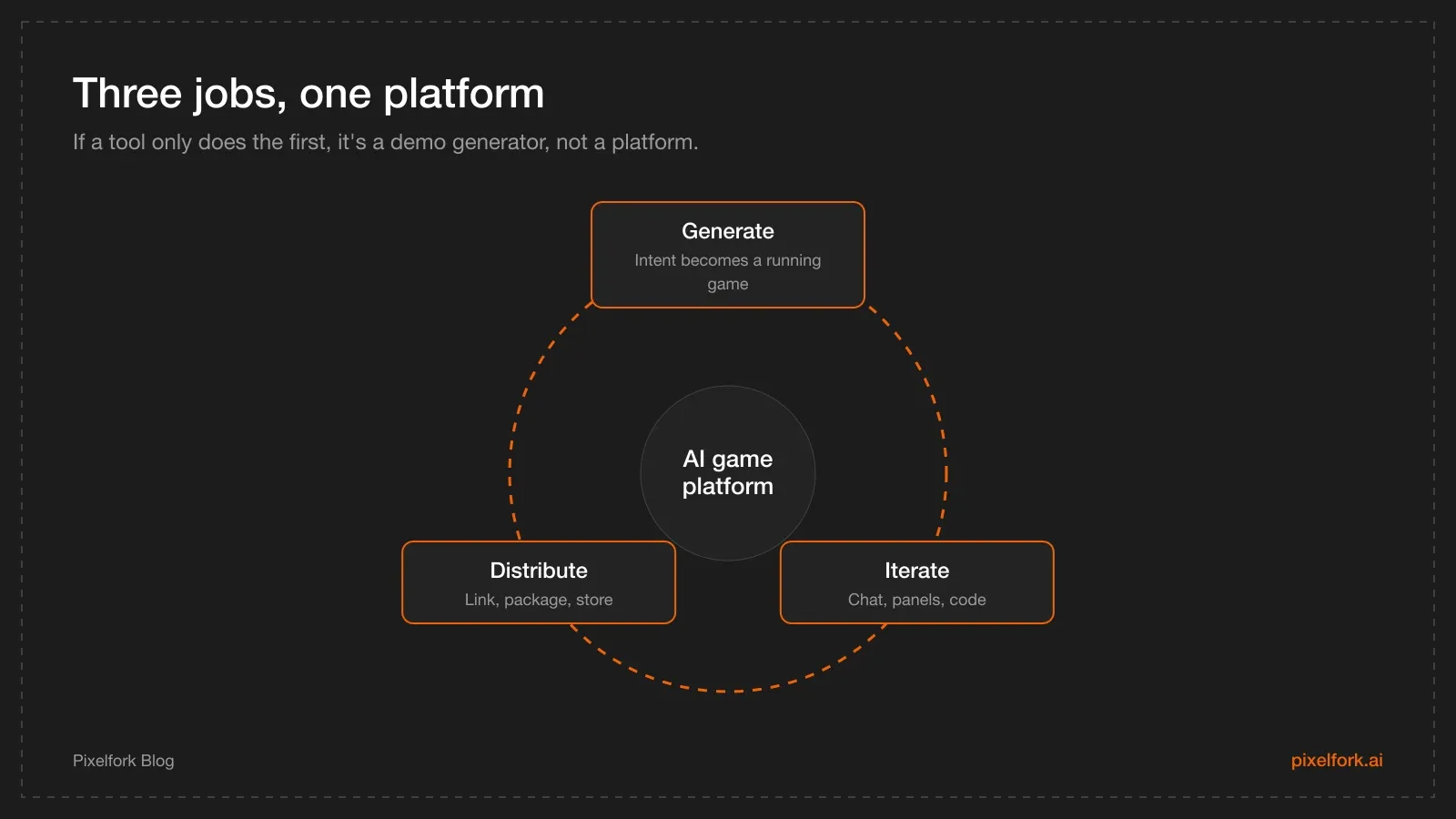
Generate, iterate, distribute — a platform does all three.
Where these platforms come from
Two things had to become true at the same time. Models got good enough to write a coherent game loop — physics, input, collision, scoring — in one pass, and web technology (JavaScript, WebGL and libraries like Three.js) got good enough to run 3D games in a browser tab on a phone.
Put together, you get a workflow that didn't exist a few years ago: describe a game, watch it appear in a preview, play it on your phone thirty seconds later.
How platforms differ
Browser-playable first
You describe a game, you get a URL. Excellent for education, jams, quick creative experiments and sharing. The catch comes when you want an app store listing, which needs a build, not a link.
Engine-project first
The tool builds a project you open in a desktop engine. You own the project and can target many platforms — at the cost of the engine's setup and build pipeline.
Web tech plus mobile packaging
The game runs on web technology, and the platform also packages Android artifacts: an APK for testing, an AAB for the Play Store, and often a full native project for ads and in-app purchases. Pixelfork works this way; see the export pillar for the pipeline, or the honest comparison of all three paths.
AI platform vs game engine vs no-code builder
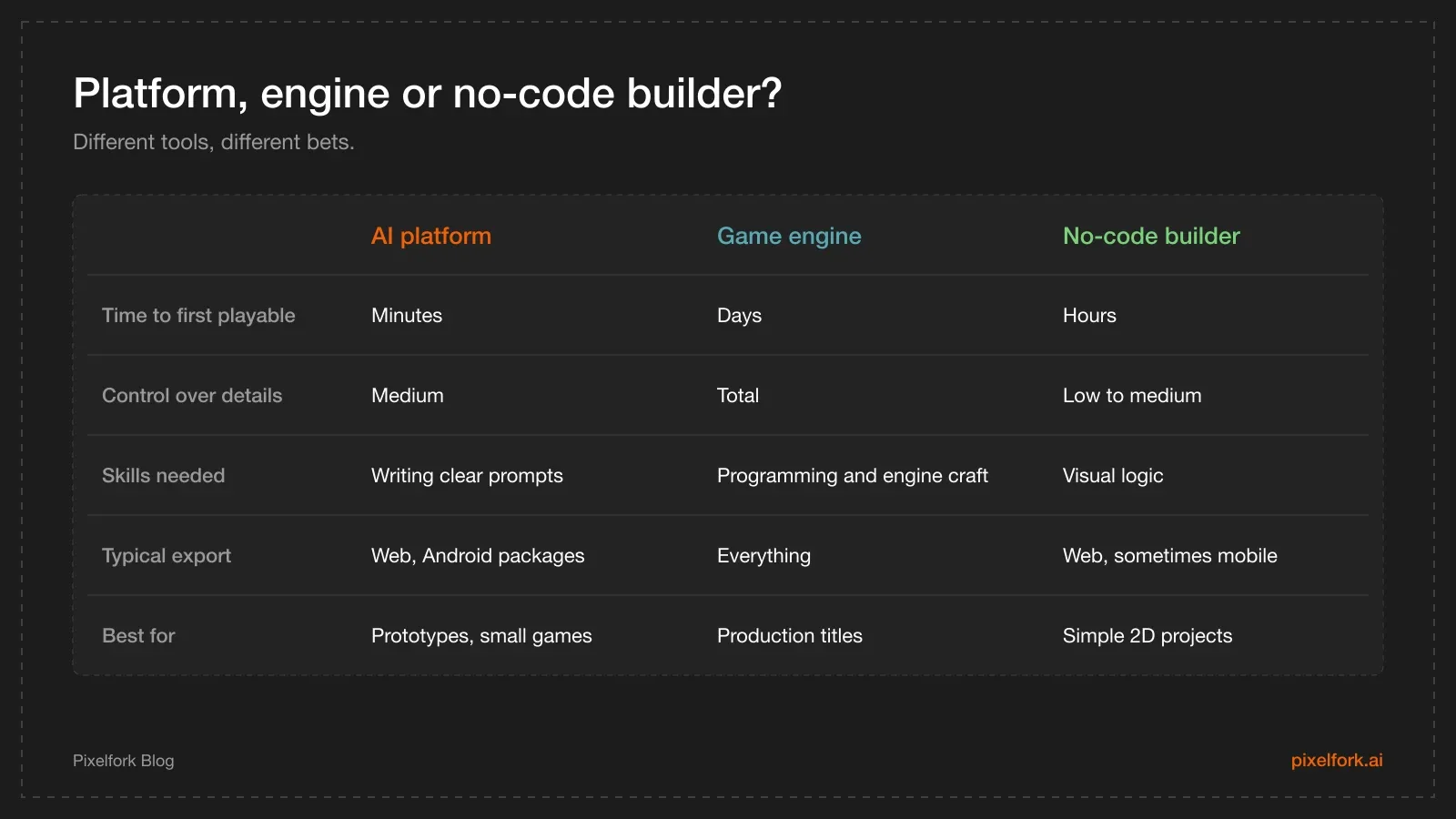
Three categories, compared on what actually differs.
The practical rule: if you know exactly what you're building and it's big, use an engine. If you want to find out whether an idea is fun this week, use an AI platform. If you want fixed genres with drag-and-drop logic, a classic no-code builder may fit.
What "good enough" means here
A generated game is a starting point with real value: it proves the loop, it plays on a phone, and it gives testers something concrete to react to. What it isn't — yet — is a polished, balanced, monetised product. Level design judgement, difficulty curves, art direction and economy tuning remain human work, and they're the difference between a prototype and a game people keep playing.
A worked example: an endless runner built with AI can be playable in an afternoon, but whether the speed ramp feels fair is something only playtesting tells you.
A buyer's checklist
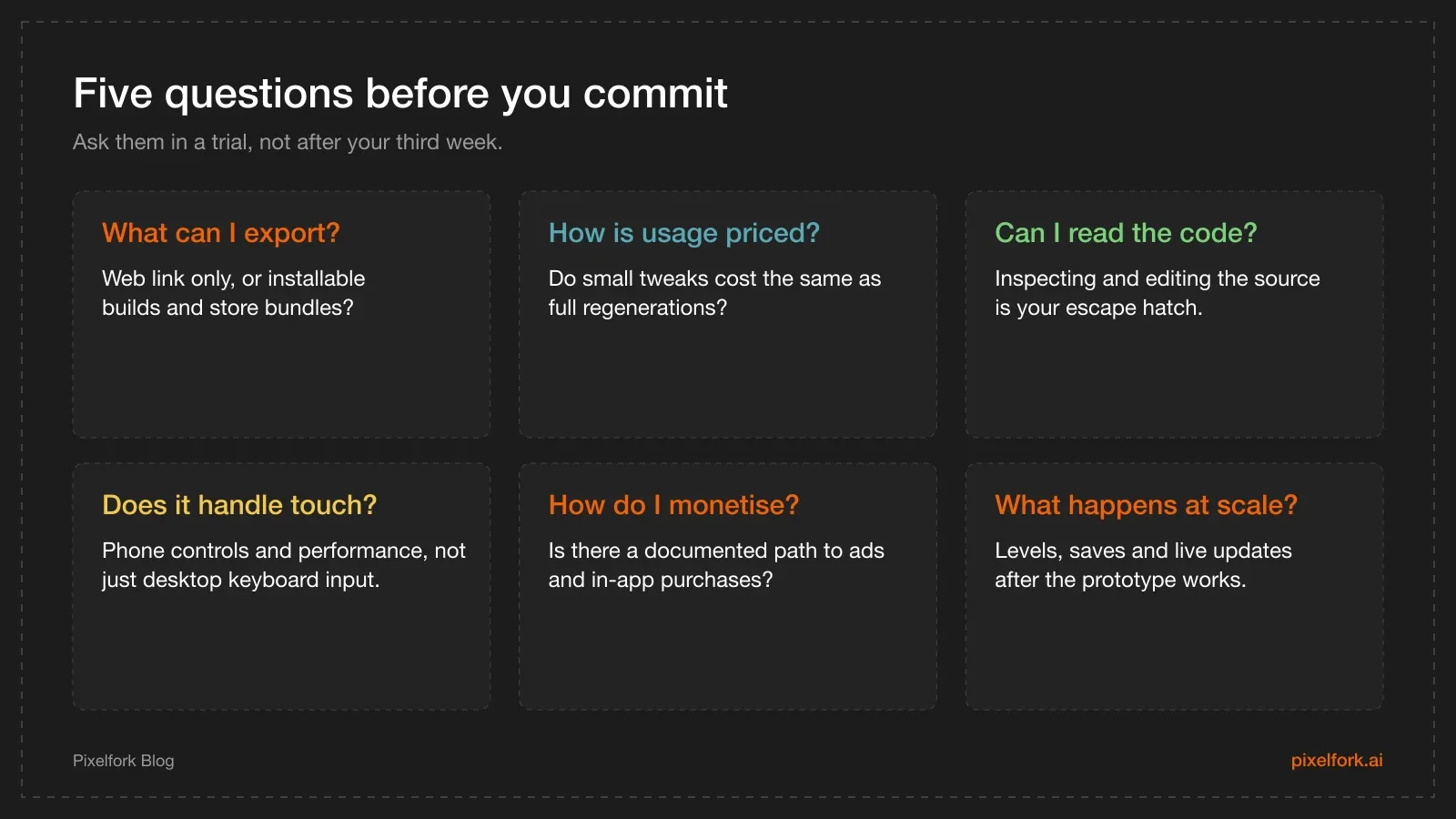
The questions that separate a demo from a platform.
A note on pricing models, because it surprises people: most platforms charge per generation. In Pixelfork, the first generation of a project costs 2 credits and each chat change costs 1, while playing the preview, browsing version history, editing code directly and publishing don't consume credits. That shapes how you work — structure through chat, feel through the Mechanics Editor.
Where Pixelfork fits
As one concrete example of the category: you describe a game in chat and get a playable 2D or 3D game built on JavaScript and Three.js, usually within minutes. You pick Desktop or Mobile / Tablet up front (and can't change it later). You refine through chat, tune values in a panel without spending credits, and inspect or edit the code. When it's ready, you publish a playable link — optionally on your own domain — and export an APK, an AAB, or the full Android Studio project.
Other paths in this category are legitimate for other goals; the useful question is which finish line you're aiming at.
The biggest limitations today
- Scope. These platforms shine on small, clear loops. Sprawling systems still need engineering.
- Consistency at length. The more systems a game has, the more carefully you have to add them one at a time.
- Art direction. Generated art is a starting point; a coherent visual identity still takes a human eye. Our 2D art pipeline notes apply here too.
- Store realities. Policy, ratings, testing gates and monetisation plumbing don't disappear because an AI wrote the loop.
How these platforms work, in plain terms
Under the hood, most chat-to-game platforms follow the same three steps:
- Your prompt becomes a specification. The model turns "a runner with three lanes and a jump" into a structured plan: entities, controls, rules, win and lose conditions.
- The specification becomes code. Usually JavaScript with a rendering library — Three.js for 3D, canvas or WebGL for 2D — plus asset choices and a game loop.
- The code runs in a sandbox you can play immediately, and each follow-up message edits that code rather than regenerating from scratch.
Two consequences follow. First, small, specific requests work better than large vague ones, because they map to smaller edits. Second, the output is inspectable: if you can read the code, you can always verify and fix what the model did — which is the most underrated feature in this category.
What has changed recently
Three shifts made the category practical rather than a novelty:
- Iteration replaced regeneration. Early tools rebuilt the whole game on each request; current ones edit the existing project, which is what makes conversation useful.
- Packaging arrived. The gap between "playable link" and "store build" is where most of this year's product work has gone: Android bundles, native project exports, custom domains.
- Non-AI controls came back. Value panels and code tabs exist because pure chat is a bad interface for numbers. The best workflows now mix both.
Cost models, and why they shape your workflow
Nearly every platform in this category charges per generation, which quietly shapes how people work. When each change costs the same, users stop experimenting — the opposite of what prototyping needs.
Look for a clear split between what's metered (generation) and what's free (playing, reverting, editing code, tuning values, publishing). In Pixelfork that split is explicit, and it's the reason the recommended workflow is "chat for structure, panel for feel" — see tuning game feel without burning credits.
A short glossary
- Text-to-game. Generating a playable game from a natural-language description.
- Prototype. A playable version good enough to judge the idea, not to ship.
- Playable link. A URL that runs the game in a browser with no install.
- APK. An Android package that installs directly on a device.
- AAB. The Android App Bundle format Google Play requires for new apps.
- Native project export. The full engine or Android project, for integrations the web editor can't do.
- Credits. Metered units consumed by AI generation, usually not by playing or publishing.
- Mechanics panel. A UI exposing the game's numeric values for direct editing.
Questions to ask in a trial
A free tier tells you more than any review if you use it deliberately. In your first session:
- Generate one game, then make one structural change and one numeric change. Note what each cost.
- Open the code view. Can you read it? Could you fix a small bug yourself?
- Open the export menu before you need it, and see exactly what's on offer.
- Try the game on your own phone, not the desktop preview.
Twenty minutes of that is worth more than a week of comparison articles — including this one.
FAQ
Is an AI game development platform the same as Unity?
No. Unity is a general-purpose game engine with a full editor, asset pipeline and multiplatform build system. An AI game development platform generates a working game from a description and helps you iterate and ship it — usually within a narrower scope, and with far less setup.
Do I still need developers?
For a prototype or a small game, often not. For production monetisation, native SDKs, backend features or a large content pipeline, developer time still pays for itself — even if the gameplay was generated.
Can these platforms publish to Google Play?
Some can, if they export an Android App Bundle. Pixelfork exports APK and AAB files plus a full Android Studio project. A tool that only produces a web link can't submit to Play without an extra packaging step.
Who owns the code the AI generates?
Check each platform's terms. Practically, the thing to look for is whether you can read, edit and take the source with you — Pixelfork exposes the code in the editor and in the Android Studio project export.
What skills help most?
Writing clear, specific prompts; a sense for game feel; and basic debugging patience. Reading JavaScript helps a lot when you want to fix something precisely rather than describe it three times.
What's the biggest limitation today?
Scope. These tools are very good at one clear loop and much weaker at large interconnected systems. Plan small, ship, then expand.
Want a concrete example? Generate a Mobile / Tablet prototype on Pixelfork and open the export menu to see exactly what you'd walk away with.